Hanging Localization Step Completed

We've identified an issue affecting some users where the localization step for a task or shard hangs indefinitely. We are working in conjunction with Google to identify a root cause and solution. To that end, if you are experiencing this issue, please share the details of your task so that we can more quickly isolate the root cause and find a solution.
Please provide the following pieces of information as attachments (if accessible):
- stdout
- stderr
- Task.log
- Operation ID
You can find the stdout, stderr, and Task.log by clicking the green folder icon (called "execution directory") and downloading the relevant files.
The Operation ID can be found by clicking the 'i' icon (called "compute details") for a currently running task/shard. From there you'll see a pop-up with a path for a header that looks something like projects/<billing_project>/operations/<number_string> at the top and as the value of the name field in the details box. Please provide the full path—this is the Operation ID.
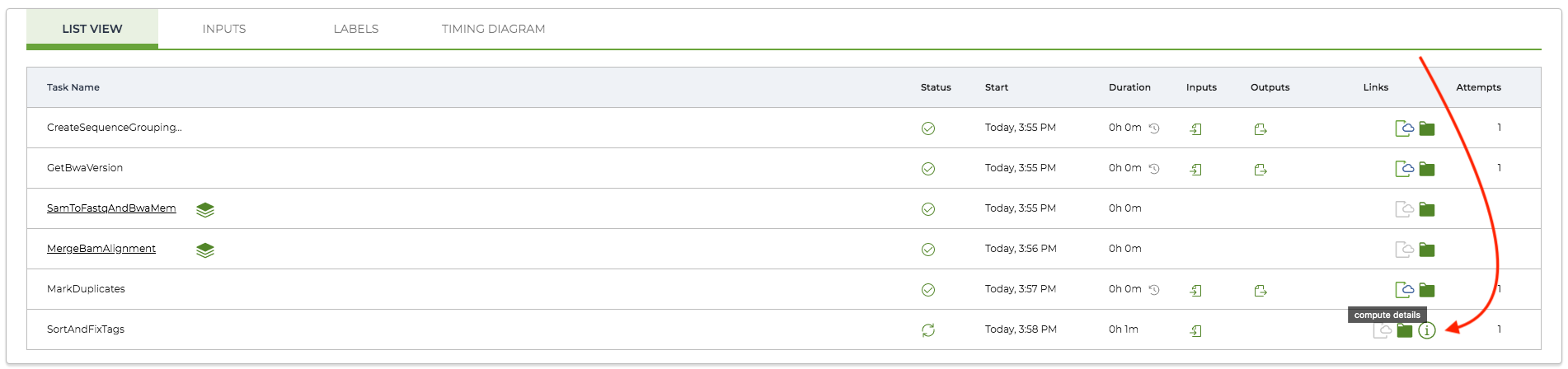
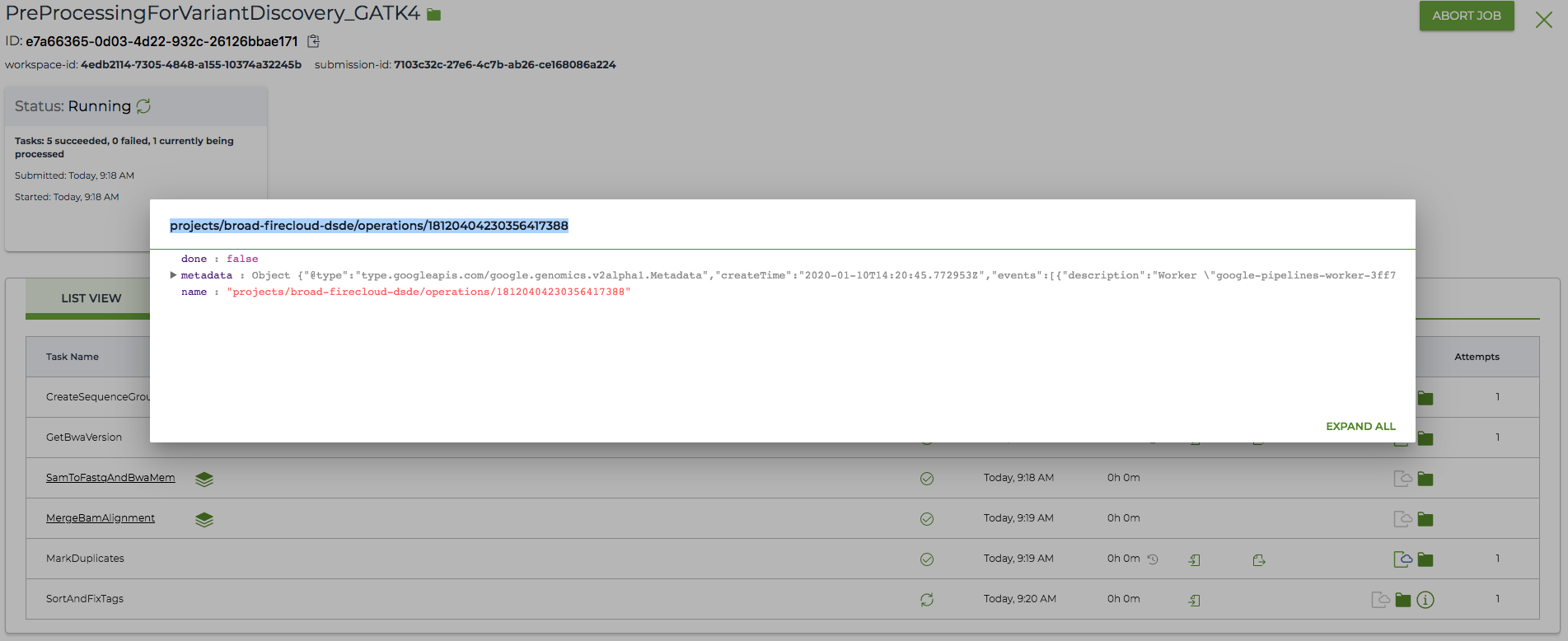
If you do not see a compute details icon for the task on the Job Manager page, you can click into the underlined task to see the associated shards. The compute details icon should be visible there, and you can grab the Operation ID by clicking it.
If you do not feel comfortable sharing this information on the forum, please email it to Terra-support@broadinstitute.zendesk.com with the Subject line: Hanging Localization Issue. Add any other details you believe may be relevant to our and Google's understanding of the work being done.
Thank you for your participation in the troubleshooting effort.
Comments
45 comments
Hello All,
We received an update from Google letting us know that they were able to isolate the source of the bug and are working on a fix. However, they have resolved that the fix will take a bit of time. Therefore, they are currently working on rolling back to a previous unaffected version of the component. We are waiting to hear when this rollback will take effect and will update this thread with that information as soon as we hear!
Thank you all for your patience,
Sushma
Hi all,
Terra developer here. We have a possible new lead from Google that we're sharing on an as-is basis in case folks want to try it. We have not validated it extensively, though preliminary results are promising.
Google has advised us that increasing the size of your disk improves its I/O performance [0] and could reduce the chances of a localization stall. The cost savings from lowering localization time may outweigh the increased disk cost. A possible lower limit for disk size when implementing this change could be 200 GB, based on Google's documentation.
Adam
[0] https://cloud.google.com/compute/docs/disks/performance
Hello Adam,
Thank you for this update. Is this the only solution Google offers us for this issue or there is a plan to roll back their updates that caused it in the first place?
The easiest solution is to throw more money at the problem.
Thank you,
Luda
Hi Luda,
Google is still working on a definitive solution, but the suggestion to speed things up by increasing disk size does look promising [0].
Here is a worked example showing how increasing disk size can actually decrease cost.
In testing, we observed a particular workflow that took 1.25 hours to localize on an 80 GB disk and just 0.25 hours on a 500 GB disk. Let's pair each of those disks with an n1-standard-4 VM (4 CPUs, 15 GB). I assume a 0.5 hour task runtime.
Persistent disk cost: $0.040 per GB per month
VM cost: $0.190 per machine per hour
80 GB disk:
1.25 hours localization + 0.5 hours task runtime + 1.25 hours delocalization = 3 hours of disk and CPU.
Disk cost: $0.01
VM cost: $0.57
Total: $0.58
500 GB disk:
0.25 hours localization + 0.5 hours task runtime + 0.25 hours delocalization = 1 hour of disk and CPU
Disk cost: $0.08
VM cost: $0.19
Total: $0.27
The key thing to remember is that you are charged for the VM for the entire localization period; and the charges for the VM are a lot more expensive than for the disk.
Hope this helps and rest assured we will continue to update this thread as we learn more.
Adam
[0] https://cloud.google.com/compute/docs/disks/performance
Hello Adam,
I have tried this solution: increasing disk size to 600GB. Localization itself takes now an hour and then task anyway gets stuck for more than 3 hours at the same point (still running not sure how long it can be stuck there):
Are there any updates from Google? As far as I can see now Terra is completely unusable. I have to babysit all my runs to make sure they do not idly sit and waste money.
Hi Luda,
How big are the files you're localizing to the 600 GB disk?
One hour of localization still seems like a pretty long time, and we know that longer localization times are more likely to induce the bug.
You have correctly identified that hanging at "Localization script execution complete" indicates you've run into the bug. It is deeply unfortunate that it is still happening and we are working the problem both from our side and the Google side.
Adam
Hi Luda,
An eagle-eyed colleague looked at the operations metadata for the task pictured and noticed that the disk size used is actually 60 GB, not 600. 60 GB would not be enough to reliably speed past the bug.
Is there possibly a typo in your post, or in the WDL?
Furthermore, we have received word from our contact at Google that they will be fixing the behavior for small disks tomorrow, 2/11.
Best,
Adam
Hello Adam,
This is great news. I am sure will try it out.
I will double-check why the size of my VM was 60GB instead of 600GB.
Thank you,
Luda
Hello,
I tried to increase the VM size but it did not help. I gave 250G for the localization of WES samples (~10G) and still the jobs were not running.
Maybe instead of reimbursement, can you please pay for us to download the files into the Broad's machines so we could just run the jobs vis the UGER system?
Thanks,
Yosi
Adam Nichols thank you for the updates thus far. Can you folks tell us when the fix has been implemented today? Cheers,
Google did release the fix and our testing looks good.
Hello,
I rerun jobs at 3pm yesterday that shouldn't take more than 2-4 hours. About half of them are still running. See here "pazlabtest/Colon_Cancer_Sam"
Can you please assist me downloading the 83 WES file to the Broad's server so I could run it via the UGER system? For a week i'm trying to run something that should take a few hours.
Thanks,
Yosi
Hi Yosi,
I've taken a look at some of the logs for the latest submission in that workspace and it does not appear to be hanging on localization—the shards appear to get stuck on a docker run command, specifically it seems to be getting stuck on this python3 /src/msmutect.py part. You can tell that localization is working fine as the same behavior shows up between the successful tumor_msmutect task and the failed/aborted normal_msmutect task.
In both cases, the task moves on to the Running user action step.If you would like us to take a closer look, please feel free to open a ticket with us at support@terra.bio and we'll be happy to take a look.
If you would like to download files to the Broad server, we recommend using gsutil cp from the workspace bucket to the Broad server. BITS may be a good resource if you require additional help in figuring out how to do this. You can open a ticket with them by going to broad.io/help.
Kind regards,
Jason
Hello Jason and Adam,
I ran a few pairs through our regular CGA pipeline and it seems the fix that Google has implemented fixes hanging issue. I also figured out why my disk size didn't increase and will increase it for future runs.
Thank you again for your help and patience!!!
Luda
No problem and thank you for working with us as we sorted it out.
Please sign in to leave a comment.