Inconsistent reformatting to scientific notation when downloading TSV

Hello,
I have an issue when downloading a data table as TSV where values are sometimes being reformatted to scientific notation when they are downloaded. This does not seem to affect the entity:_id column, but other columns:
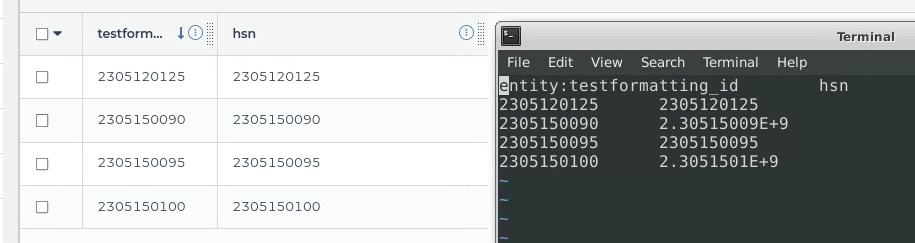
This issue only happens when I click the three dots next to the table and then select Download as TSV. The IDs do not get reformatted if I instead select all rows in the table then click Export > Download as TSV.
Comments
3 comments
Hi Sam,
Thanks for writing in! I did some testing and I'm having difficulty replicating the results you're seeing here. Would it be possible for you to share the workspace where you are seeing this issue with Terra Support by clicking the Share button in your workspace? The Share option is in the three-dots menu at the top-right.
Please provide us with a link to your workspace and the name of the data table. We’ll be happy to take a closer look as soon as we can!
Kind regards,
Josh
Thanks for looking into this.
I shared the workspace, here is the link: https://app.terra.bio/#workspaces/cdphe-snp-linux/CDPHE-Terra
The test data table screenshotted above is named "testformatting". I first observed the issue in the "bact-0349-miseq" data table. For sample 2305150090, the '"hsn" and "sample_name" values are reformatted to scientific notation in the TSV file when it is downloaded from clicking the three dots in the list of data tables, but the values are not converted when selecting all the rows then clicking export.
Hi Sam,
Thanks for providing access! I did some testing and was able to replicate the error. I've already opened a bug report with our engineering teams, and I will let you know if we deploy a fix for this bug.
I also noticed some other requirements to cause this bug. The numbers need to be at least ten digits, the first digit must be a number higher than 1, and the final digit must always be a zero.
In the meantime, I believe that selecting the rows and using Export > Download as TSV is a good workaround.
Thanks again for letting us know about this bug, and please let me know if you have any questions.
Best,
Josh
Please sign in to leave a comment.