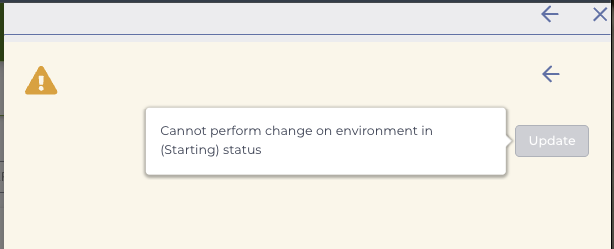
Issue on bootup | "Cannot perform change on environment in (Starting) status"

Hi Terra Support Team,
I am unable to start my Jupyter Notebook environment.
I was met with a notification that I had run out of space while working on an analysis. I interpreted this as running out of memory, so I updated my environment with increased memory and hit 'update'. However the environment has not started since then.
Could it be that I had run out of room on my persistent disk instead? Did requesting additional memory without changing the disk space cause an error that prevents the new environment from booting up?
I do not wish to "delete" the environment since I have intermediate files from the previous analysis saved on there. However, I am unable to boot it up.
Would appreciate guidance.
Comments
1 comment
Hi Vrishabhadev,
Thanks for writing in. If you received a message that you have run out of space, it likely refers to Persistent Disk space. It's likely that trying to adjust the configuration with a completely full PD resulted in this error.
Are you still seeing that the environment is stuck in Starting at this time? If not, can you try increasing the PD size by at least 50 GB?
Kind regards,
Jason
Please sign in to leave a comment.