
The following release notes correspond to October 12, 2021 - October 21, 2021. In addition to these changes, this release includes back-end updates to workflows, Google integrations, and notebooks to improve upcoming features.
Data Repository
- Combined ingest now handles
fileRefarray columns. - Added a new option to the /api/repository/v1/datasets/<id>/ingest endpoint ("csv_add_row_ids") to fill in the
datarepo_row_idcolumn when ingesting data using a CSV file. The option is set totrueby default, so set the option tofalsein order to keep the current behavior and specify thedatarepo_row_idcolumn in the ingest file.
Interactive Analysis (Notebooks, RStudio, Galaxy)
- Fixed a bug so that the "Compute type" drop-down now defaults to Standard VM.
- The following Spark UIs (a.k.a. Dataproc component gateway web interfaces) can be launched on Terra UI using the compute (a.k.a. runtime) modal:
-
- MapReduce History Server
- Spark History Server
- YARN Application Timeline
- YARN Resource Manager
-
Platform Foundation
- Fixed a bug when SAM returned a user email with any uppercase characters. This made it difficult to remove users from workspace roles.
Workspaces
- Fixed a bug that decreased browser performance while waiting for long-running asynchronous data imports.
- When configuring a workflow to run on a Terra Data Repo snapshot, we now hide the "Use defaults" command for workflow outputs, since those defaults do not typically apply to Terra Data Repo snapshots.
- Users without permissions to view Terra Data Repo snapshot data tables inside a workspace previously received an unhelpful error message, stating that, "User does not have bigquery.jobs.create permission”. We now provide more helpful visual indications when these tables are unavailable, as well as a message indicating which permission level is needed to see the data.
- When viewing a data table inside a workspace, the "All (
NUM)" command now becomes a "Filtered (NUM)" command if you have a current text filter. This selects all rows that match the filter.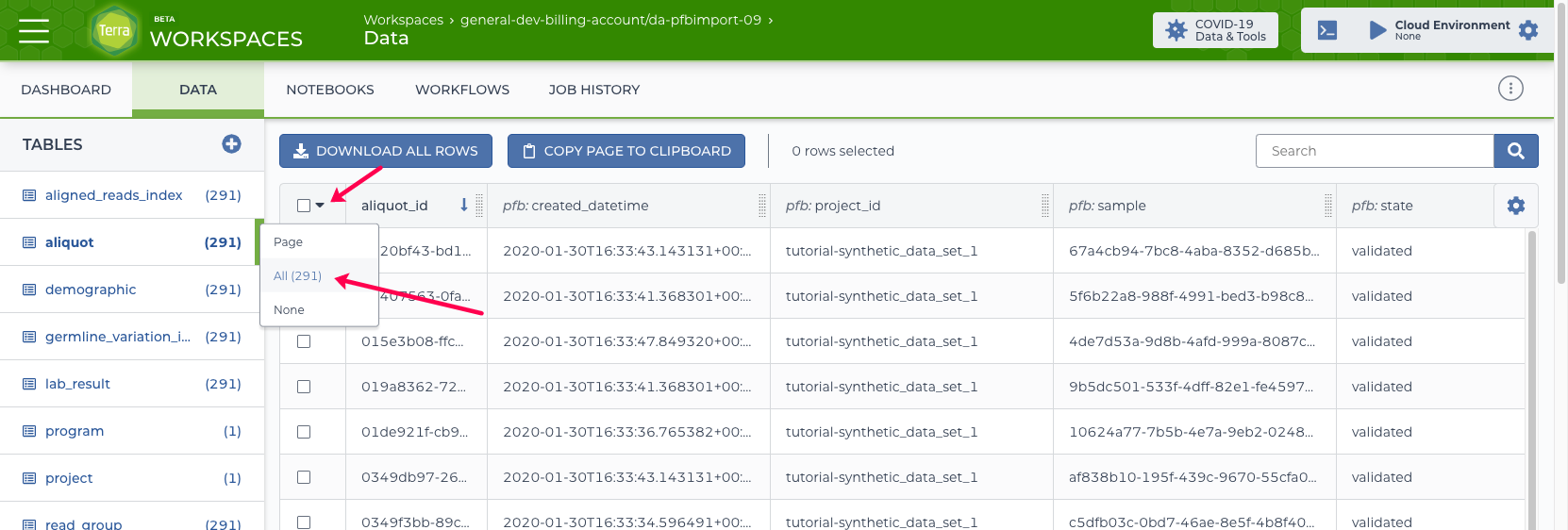 The above image shows an example of the "All (
NUM)" command as seen in the selection popup menu, which allows you to select which rows to be downloaded.